Author: adsturbo.ai | Published: August 26, 2026 | Updated: August 26, 2026
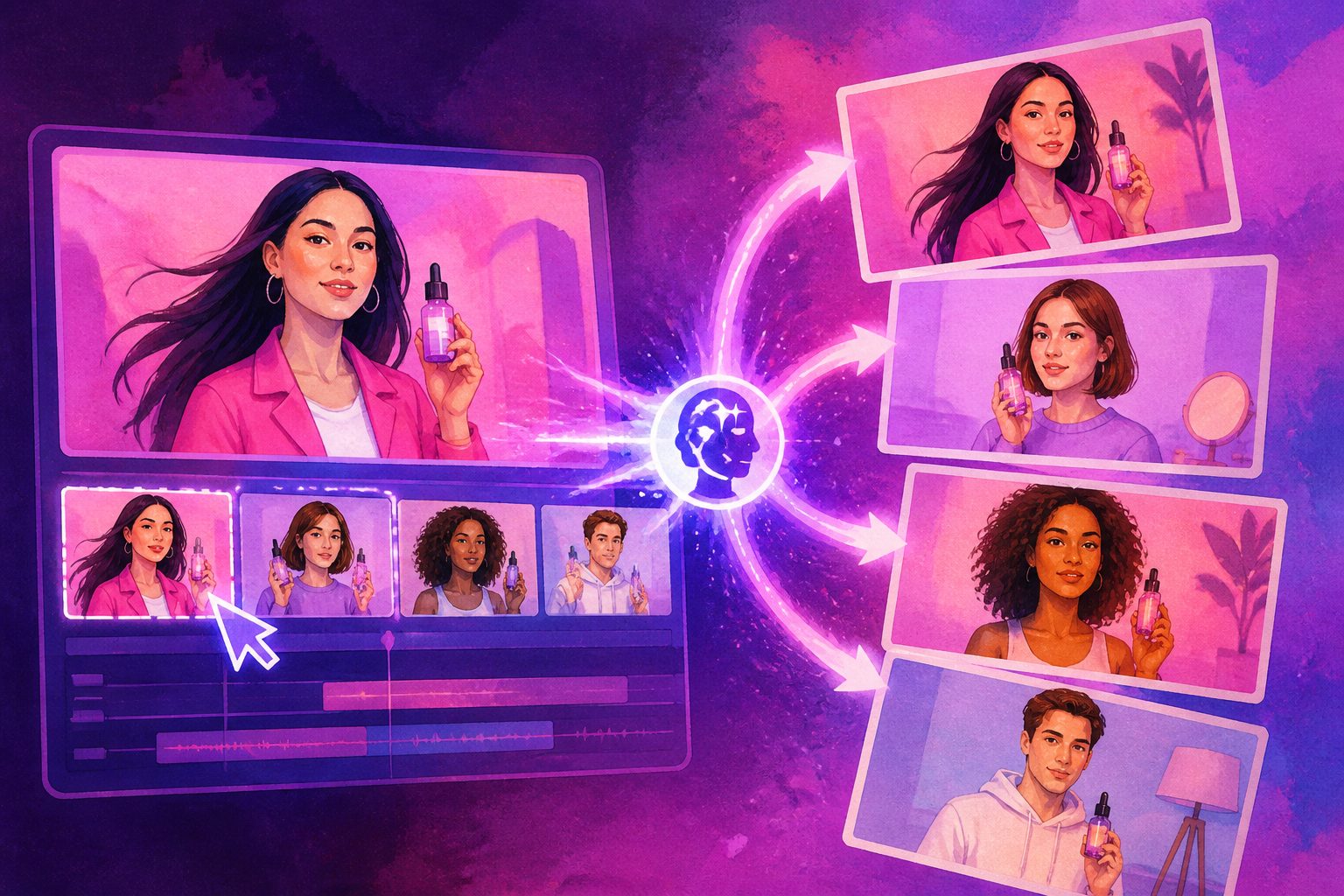
ai video character swap is the process of replacing the visible person or character in a video while preserving the original motion, camera rhythm, scene, and ad structure. For ecommerce teams, its strongest use is not novelty editing; it is controlled creative variation: testing different presenters, demographics, markets, and hooks without reshooting every clip.
The important distinction is scope. A face swap changes facial identity. A full character swap can change the performer’s face, body, styling, silhouette, or persona while trying to keep the original action and environment intact. That makes it useful for UGC-style product ads, localized creator ads, founder-message variants, and product demos where the movement already works.
What is AI video character swap?
AI video character swap is video-to-video editing that uses a source clip and a reference person or character to generate a new clip with the replacement identity. The best outputs preserve three things: movement, scene continuity, and commercial intent.
In practice, the input usually includes:
- A source video with the action, framing, and timing you want to keep.
- A target character image or persona reference.
- Optional instructions such as “replace the presenter only” or “keep the product unchanged.”
Research literature describes this as a difficult human-centric video generation problem because the model must preserve pose, appearance, background, and temporal consistency at the same time. The 2024 paper Replace Anyone in Videos frames the task as image-conditioned, pose-driven video inpainting, which explains why clean masks, stable motion, and reference-image quality matter so much.
Character swap vs face swap vs lip sync
Use character swap when the whole on-screen person needs to change; use face swap when only identity changes; use lip sync when speech timing must match new audio. Combining them can work, but each solves a different production problem.
| Task | What changes | Best for | Common failure point |
|---|---|---|---|
| Face swap | Face identity | Simple presenter edits, reaction shots | Neck, hairline, side angles |
| Full character swap | Face, body, styling, persona | UGC variants, localization, audience testing | Hands, clothing edges, occlusion |
| Motion control | Movement transferred to a static character | Dance, gestures, product handling | Foot placement, object contact |
| Lip sync | Mouth movement aligned to audio | Translated ads, voiceover replacement | Teeth, fast speech, profile angles |
| Video translation | Voice, subtitles, language | Cross-border ecommerce campaigns | Cultural fit, subtitle density |
This distinction matters for budget and QA. If the ad already has the right talent, body language, and wardrobe, a full swap is overkill. If the goal is to test whether a skincare product performs better with different age ranges or regional presenters, face-only edits may not be enough.
AdsTurbo provides AI Face Swap, Lip Sync, Character Swap, Video Translation, Motion Control, AI Upscaling, AI Eraser, Background Replace, and Video Subtitle tools, so ecommerce teams can treat replacement as one stage in a broader ad-production workflow rather than a standalone trick.
When should ecommerce teams use character replacement?
Character replacement is most valuable when the winning element is the shot structure, not the original actor. In ecommerce ads, that usually means the first three seconds, demonstration sequence, objection handling, and CTA already work.
Good use cases include:
- Turning one creator-style product demo into multiple audience-fit variants.
- Localizing a presenter for different countries while keeping the same product footage.
- Testing founder, expert, customer, or lifestyle personas against the same offer.
- Reusing a proven product-handling motion with a new AI actor or brand character.
- Creating seasonal campaign versions without booking another shoot.
For example, a gadget seller may have a clip where a hand reveals the product, presses a button, and shows the result. The action is valuable because it demonstrates the benefit clearly. Swapping the on-screen presenter can help test whether a younger creator, parent persona, or professional reviewer style performs better while the product proof stays consistent.
AdsTurbo’s Replace Character in Video AI guide covers the practical replacement workflow in more detail, while adsturbo.ai brings related tools into one ad creation platform.
A practical 5-step workflow for better results
The best workflow is to lock the source performance first, then vary the character, language, and format in controlled batches. Randomly swapping people into weak videos only scales weak creative.
- Choose a source clip with proven structure. Favor clips with a clear hook, simple motion, visible product, and one primary person.
- Prepare a clean character reference. Use a sharp front-facing or three-quarter image with visible hair, face, clothing style, and body cues when available.
- Write replacement instructions narrowly. Specify who should change and what must stay untouched: product, background, hands, logo, subtitles, and CTA.
- Generate small test batches. Produce 3–6 variants first instead of 30. Review artifacts before scaling.
- Finish the ad after the swap. Add subtitles, translate voiceover, upscale, resize, and export platform-specific cuts only after the replacement passes QA.
AdsTurbo Character Swap supports uploading a source video or image and a target character image, while preserving action, lighting, and scene realism. For product-led campaigns, AdsTurbo also supports creating UGC-style videos from product images; a product image can be uploaded as JPG or PNG, and AI product video from URL is useful when teams want to move from listing assets to video concepts faster.
Original QA framework: the 7-point swap scorecard
A character-swapped ad should be judged like performance creative, not like a demo reel. The output is usable only if viewers understand the product, trust the presenter, and do not notice the edit before the value proposition.
Use this 7-point scorecard before exporting variants:
| QA area | Pass condition | Why it matters |
|---|---|---|
| Identity consistency | Face, hair, body, and styling stay stable across frames | Prevents uncanny “identity drift” |
| Product integrity | Product shape, logo, packaging, and color remain unchanged | Avoids misleading product claims |
| Contact realism | Hands, fingers, and object touches look plausible | Critical for demos and unboxing ads |
| Motion continuity | The new character follows the original pose and rhythm | Preserves the winning edit structure |
| Lighting match | Skin tone, shadows, and color temperature fit the scene | Makes the swap feel native |
| Speech alignment | Mouth motion fits audio if the person speaks | Essential for testimonial-style ads |
| CTA clarity | Offer, discount, and next step are readable | Protects conversion intent |
A practical scoring method is simple: give each area 0, 1, or 2 points. A clip scoring 12–14 is ready for resizing and localization. A clip scoring 9–11 may work after editing. Anything below 9 should be regenerated with a cleaner source, better reference, or narrower prompt.
This scorecard is intentionally stricter than most tool tutorials because ecommerce ads fail commercially when product accuracy or trust breaks, even if the swap looks impressive at first glance.
Field-tested production notes from ad variant reviews
In ecommerce character replacement, the highest-risk frames are usually not faces; they are hands, product contact, and occlusions. This pattern appears repeatedly in creative reviews because hands and objects carry the buying proof.
Across internal ad-variant reviews for ecommerce-style clips, three patterns consistently separated usable swaps from throwaway generations:
- Single-person shots were more reliable than crowded scenes. Multiple bodies increase mask confusion and identity bleed.
- Waist-up product demos outperformed full-body motion clips. The model has less limb motion to preserve and more facial detail to anchor.
- Shorter clips were easier to approve. A 6–10 second hook or product proof segment creates fewer opportunities for drift than a long monologue.
The useful conclusion: treat character replacement as a modular step. Swap the presenter in the hook, proof, or CTA segment first. Then assemble the final ad clip by clip. AdsTurbo supports Clip by Clip editing, video subtitles, translation, product image generation, background replacement, white-background images, event posters, and API access for teams that want a more systematic production flow.
How to choose a source video that will survive the swap
The best source video has one visible subject, stable framing, clean lighting, and limited occlusion. If the original clip is chaotic, the replacement model must solve too many problems at once.
Use this checklist before generating:
- One primary person in frame.
- Clear separation between person and background.
- Product is not hidden behind fingers for long periods.
- No rapid camera whip, mirror reflection, or heavy motion blur.
- The performer’s face is visible for most speaking segments.
- The product remains in the same visual region long enough to be understood.
- Logos and regulated claims are not altered by the generated output.
If the video includes a hard-to-replace section, cut it out first. For instance, a beauty ad may have a strong opening line and final CTA, but a messy middle section where hair crosses the face and the hand covers the bottle. Replace only the stable sections, then bridge them with product close-ups or image-based creatives.
Prompting tips for cleaner AI person swap video outputs
A good prompt tells the model what to replace, what to preserve, and what to avoid. Vague prompts such as “change the person” often create unnecessary changes to the product, scene, or wardrobe.
Use a prompt structure like this:
Replace only the presenter in the video with the reference character.
Preserve the original camera angle, product, hand motion, background, lighting, timing, and CTA structure.
Do not change the product packaging, on-screen offer, or scene layout.
Keep the result realistic for a UGC ecommerce ad.
For multi-person videos, label positions clearly: “replace the person on the left,” “keep the person holding the product unchanged,” or “replace only the speaker.” If the replacement is a brand mascot or stylized avatar, say whether the output should remain realistic, semi-realistic, or animated.
AdsTurbo’s Ad Clone workflow can also preserve a reference ad’s early hook, rhythm, shot logic, and CTA structure while rebuilding the creative for a user’s product. That is different from blindly copying an ad: the useful part is extracting structure and conversion logic, then producing new brand-specific variants.
Compliance, consent, and platform trust
Only use character swap with assets you have rights to use, and avoid implying that a real person endorsed a product without permission. In advertising, synthetic media is not just a creative issue; it affects consent, disclosure, and consumer trust.
The U.S. Federal Trade Commission has warned that AI-generated impersonation can intensify fraud risks in business and consumer contexts, including deepfake-style misuse; see the FTC’s notice on AI impersonation protections. For advertising operations, the IAB’s AI Transparency & Disclosure Standards V2 also emphasizes risk-based transparency for synthetic humans, digital twins, AI video, and related formats.
A safe operating rule is straightforward:
- Get written permission for real-person likenesses.
- Do not create fake testimonials.
- Do not imply celebrity, employee, customer, or influencer endorsement without authorization.
- Keep a record of source rights, reference images, voice permissions, and approved claims.
- Add disclosure where the platform, jurisdiction, or brand policy requires it.
This is especially important for UGC ads. “Looks authentic” should never mean “misleads the viewer.”
Where AdsTurbo fits in the workflow
AdsTurbo is built for ecommerce teams that need AI video ad generation, creative variants, and post-production controls in one workflow. Its role is to help move from product inputs and reference creative to usable ad assets faster.
Relevant capabilities include:
- Character Swap for replacing people while preserving motion, lighting, and scene realism.
- Face Swap and Lip Sync for identity and speech-alignment edits.
- Video Translation for multilingual localization.
- Ad Clone for rebuilding a reference ad’s structure, rhythm, shot logic, and CTA.
- Product Video for product reviews, introductions, and demonstrations.
- Video Subtitle for automatic transcription and time-synced captions.
- AI Upscaling, AI Eraser, Background Replace, white-background images, product image generation, and event posters.
- API modules for image generation, Persona, AI actors, ad clone, video generation, and task handling.
AdsTurbo generation tasks are asynchronous and can be completed through status polling or webhook callbacks. API access is available on every plan, and advanced plans add team workflows and custom workflow support, which is useful when creative teams need repeatable pipelines rather than one-off experiments.
Frequently asked questions
Is AI video character swap the same as deepfake?
No. Character swap is a production technique; a deepfake is usually defined by deceptive or unauthorized impersonation. The same underlying synthetic-media capability can be used responsibly for licensed actors, AI personas, or brand characters, or misused to imitate real people without consent.
Can character swap replace the whole body, not just the face?
Yes, full-body character replacement aims to change the visible person more broadly than a face swap. Results depend on the source video, reference image, movement complexity, clothing edges, hands, and occlusion.
What kind of ecommerce videos work best?
Short UGC-style demos, product reveals, review hooks, and CTA clips work best. They usually have one presenter, direct product interaction, and simple camera movement, making them easier to preserve while changing the character.
Should subtitles be added before or after the swap?
Add final subtitles after the swap. If subtitles are baked into the source video, the model may distort them. AdsTurbo Video Subtitle can generate time-synced captions and supports exports as embedded video or separate subtitle files.
How many variants should a team generate first?
Start with 3–6 variants per source clip. Review identity stability, product accuracy, and CTA clarity before producing a larger batch. Scaling too early wastes credits and review time.
Final takeaway
AI video character swap is most powerful when it protects what already works: the hook, motion, product proof, and CTA. For ecommerce sellers, the winning workflow is not “replace anyone in anything.” It is: select a strong source clip, swap the character intentionally, score the output, then localize and format the approved variants.
Used responsibly, character replacement can turn one good product video into a structured test matrix across personas, languages, and platforms—without losing the commercial logic of the original ad.