By adsturbo.ai | Published 2026-10-13 | Updated 2026-10-13
A video ad multilingual subtitle sync tool helps ecommerce sellers turn one product ad into localized versions with translated, time-aligned, readable subtitles. The important work is not translation alone: each version also needs sentence reflow, safe-zone checks, visual review, and platform-specific export validation.
For DTC teams, subtitle localization usually fails in four places:
- The translation is technically correct but too long for the original timing.
- Line breaks split the wrong phrase or hide the product benefit.
- Captions sit behind platform interface elements.
- The final export does not match the language, aspect ratio, or campaign destination.
This workflow treats multilingual subtitles as a creative preflight process, not a final cosmetic layer.
What is a multilingual subtitle sync workflow?
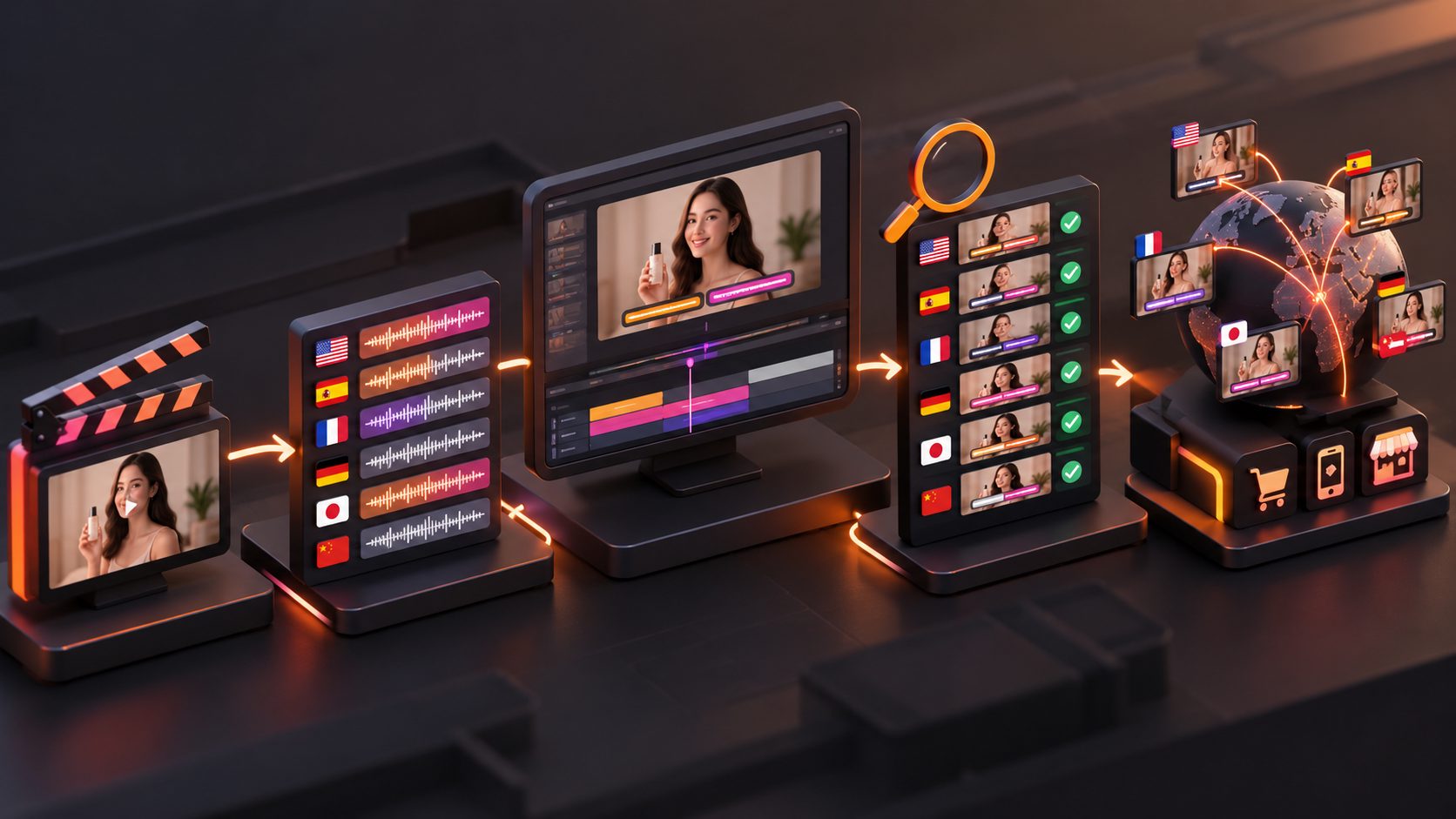
A multilingual subtitle sync workflow is the process of transcribing a source video, translating its spoken message, adapting the text to fit each scene, synchronizing captions to speech, and checking the final video before distribution.
A good workflow covers more than subtitles. It considers the voice track, on-screen claims, product names, discount language, CTA, reading speed, typography, and the visible area of the target platform. Ecommerce localization tools increasingly combine subtitle translation with dubbing, lip sync, and on-screen text adaptation rather than treating captions as an isolated file. (vozo.ai)
AdsTurbo’s Video Subtitle tool can automatically transcribe speech, generate time-synchronized captions, translate subtitles, and produce either a video with embedded subtitles or a separate subtitle file. Its subtitle styling is designed for short-form formats such as TikTok, Instagram Reels, and YouTube Shorts.
The practical distinction is simple:
- Translation changes the language.
- Synchronization matches text to speech.
- Localization QA confirms that the message remains readable, persuasive, and visible in the final ad.
Why direct subtitle translation breaks ecommerce ads
Direct translation often produces a subtitle track that is linguistically accurate but commercially unusable. The reason is that subtitle text must fit both a time window and a visual box.
A short English hook can expand substantially in another language. German may require longer compound words, while Japanese and Chinese may communicate the same idea with fewer characters but different line-breaking rules. A translation that fits the transcript may still cover a product demonstration, split a price from its currency, or push the CTA below the visible area.
Common failure patterns include:
| Failure | What the viewer sees | Likely consequence |
|---|---|---|
| Literal translation | Awkward phrasing or unnatural claims | Lower trust |
| Late subtitle entry | Caption appears after the speaker’s point | Missed hook |
| Long subtitle block | Too much text at once | Lower comprehension |
| Poor line break | Product name or benefit is split | Reduced clarity |
| Unsafe placement | Caption overlaps buttons or UI | Lost message |
| Mixed language layer | English overlay with localized subtitle | Confusing offer |
TikTok provides native caption and translation capabilities for some ad experiences, but platform-side automation does not remove the need to inspect the actual creative. The exported video may still contain untranslated text overlays, inconsistent terminology, or captions that do not match the intended campaign language. (ads.us.tiktok.com)
The four-gate subtitle acceptance framework
A useful way to manage multilingual ad production is to approve every language version through four gates: meaning, timing, geometry, and delivery. This is an original operational framework for ecommerce creative QA.
Gate 1: Meaning
Check whether the localized version preserves the selling logic of the original ad.
Review:
- Product name and variant
- Main benefit
- Usage instruction
- Discount or promotional condition
- Shipping or availability statement
- Call to action
- Safety or compliance wording
Do not approve a subtitle simply because it is grammatically correct. Ask whether a local shopper would understand what the product does, why it matters, and what action to take.
For example, “keeps drinks cold all day” and “keeps your drink cool for hours” may sound similar, but they do not carry the same strength of claim. Promotional language should be adapted carefully rather than automatically intensified.
Gate 2: Timing
Every subtitle should enter when the idea begins and leave when the idea ends. A useful working rule is to avoid presenting more than two short lines at once and to split captions at natural speech or meaning boundaries.
Review the following:
- Does the first caption appear during the first hook?
- Does the caption disappear before the next shot changes?
- Is the CTA visible long enough to read?
- Does a translated phrase remain on screen after the speaker has moved on?
- Are captions aligned with a product reveal or demonstration?
AdsTurbo supports asynchronous generation, so teams can use status polling or Webhook callbacks to place subtitle rendering into a repeatable production pipeline. That is useful when one source video produces several languages, aspect ratios, or creative variants.
Gate 3: Geometry
Geometry means checking where the text sits inside the video frame. A subtitle can be perfectly translated and correctly timed yet fail because it is hidden by platform controls or competes with the product.
For vertical ads, inspect:
- Top area: avoid placing essential claims near account or platform controls.
- Bottom area: keep subtitles away from captions, buttons, and CTA overlays.
- Side margins: prevent clipping after cropping or responsive resizing.
- Product zone: do not cover the item being demonstrated.
- Contrast: maintain legibility against moving footage.
Do not rely only on the editor preview. Review the full exported file on a phone, because platform UI and playback scaling can alter what feels safe. Social creative guidance commonly recommends keeping important text and logos away from interface regions, especially in Stories and Reels placements. (jckonline.com)
Gate 4: Delivery
The final gate confirms whether the file is usable in the actual campaign.
Create a delivery matrix with:
| Field | Example decision |
|---|---|
| Market | United States, Germany, Japan |
| Language | English, German, Japanese |
| Format | 9:16, 1:1, or 16:9 |
| Subtitle type | Burned-in video or separate file |
| Destination | TikTok, Meta, Shorts, product page |
| CTA | Localized and approved |
| Filename | SKU-language-platform-version |
| Reviewer | Native-language or market owner |
A separate subtitle file is useful when a platform accepts external captions or when a team needs later editing. Burned-in subtitles are safer when the final ad must render consistently across previews, downloads, and placements. Ecommerce captioning services also distinguish between embedded captions and exportable formats such as SRT or VTT for this reason. (vsubtitle.com)
A practical production workflow for DTC sellers
Use this sequence when localizing a winning product ad:
- Lock the master video. Do not translate while the shot order, voiceover, or CTA is still changing.
- Extract the source transcript. Mark hooks, product benefits, proof points, objections, and CTA lines.
- Create a terminology sheet. Record the approved product name, feature names, units, discount wording, and prohibited claims.
- Translate for meaning and timing. Preserve the persuasive structure, not just the original sentence order.
- Generate synchronized subtitles. Use word or phrase timing where possible instead of one large transcript block.
- Reflow each language. Adjust line breaks, punctuation, font size, and caption duration.
- Inspect safe zones. Review the product, logo, price, subtitle, and CTA together.
- Export by market and placement. Maintain a clear naming convention.
- Run the four-gate review. Reject any version that fails meaning, timing, geometry, or delivery.
- Test the creative, not only the language. Compare localized hooks, CTAs, and subtitle treatments as separate ad variants.
AdsTurbo can support this workflow with Video Subtitle, Video Translation, Lip Sync, AI Upscaling, and video editing functions. Its API also exposes subtitle and translation-related processing endpoints, while higher-level plans support team workflows, API access, and custom workflows.
For a broader creative pipeline, combine localization with a dropshipping product video ad maker for multilingual product creatives. If the source ad already performs well, use an Ad Clone workflow to preserve its hook, pacing, shot logic, and CTA structure before adapting language versions.
How to measure whether subtitle localization worked
Do not judge localization by translation quality alone. Track performance at the level where the subtitle change is expected to matter.
Recommended comparison fields:
- Three-second view rate
- Thumb-stop or hook retention
- Average watch time
- Product-page click-through rate
- Add-to-cart rate
- Conversion rate
- Cost per purchase
- Negative feedback or comment quality
- Creative rejection rate
Keep the video, offer, audience, and landing page stable when comparing languages. If several variables change at once, performance differences cannot be attributed to subtitles.
A useful diagnostic is to compare localized audio with localized subtitles against localized subtitles over the original audio. If the first version improves retention but not conversion, the message may be understood but the offer, landing page, or cultural framing may still need adaptation.
Common questions
Should ecommerce ads use burned-in subtitles or SRT files?
Use burned-in subtitles when visual consistency across placements matters. Use SRT or another separate file when the destination supports external captions and your team needs flexible editing or accessibility control.
How many lines should a social ad subtitle contain?
Two short lines are a practical starting point. The correct limit depends on font size, language, frame width, reading speed, and the amount of visual information behind the text.
Should the translated subtitle match the voiceover word for word?
It should match the meaning and timing, but not always the exact syntax. A concise subtitle may be easier to read than a literal transcript, especially when the localized voiceover uses natural phrasing.
Can one subtitle layout work for every language?
Usually not. Languages differ in word length, punctuation, character density, and line-breaking behavior. Treat the first layout as a template, then recheck each language independently.
What should be reviewed before launching?
Review the first hook, product claims, pricing, CTA, subtitle timing, safe-zone placement, typography, audio, export format, and destination-specific preview. A language version is not ready until the complete ad works as a piece of creative.
To build a repeatable multilingual ad pipeline, explore AdsTurbo’s AI video and product creative tools.