By adsturbo.ai | Published 2026-10-12 | Updated 2026-10-12
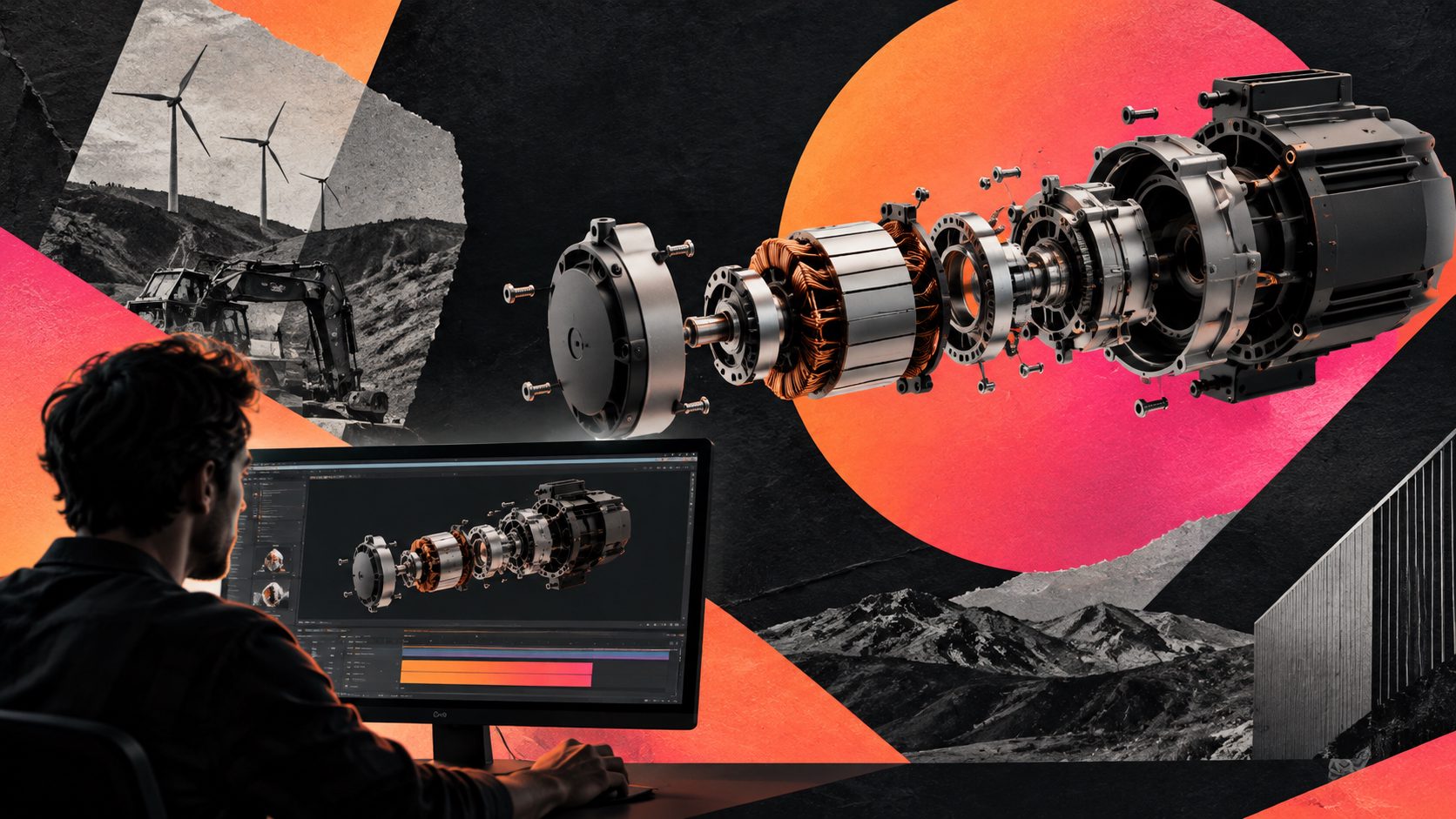
A 3D exploded view CAD to video animation B2B workflow turns an engineering assembly into a visual sales asset. Instead of asking buyers to interpret drawings, the video separates key components, explains their relationships, and connects each visible feature to a purchasing reason.
For industrial machinery and equipment exporters, the goal is not simply to make CAD “move.” The goal is to help a distributor, engineer, or procurement manager understand what the product does, why it is different, and what action to take next.
What is a 3D exploded view CAD to video animation B2B workflow?
A 3D exploded view CAD to video animation B2B workflow converts a CAD assembly into a structured video that shows components moving apart, internal mechanisms, assembly logic, or operating principles. It is useful for sales presentations, product pages, trade shows, distributor training, installation guidance, and technical advertising.
The strongest industrial animation services position exploded views alongside cutaways, assembly sequences, product demonstrations, and training films. CAD-based animation is especially useful when a camera cannot show the inside of a machine or when shipping a physical demonstration unit is impractical. (maverickframe.com)
A practical distinction matters:
| Asset type | Best buyer question it answers | Typical use |
|---|---|---|
| Exploded view | “What is inside, and how do the parts relate?” | Technical sales and product education |
| Cutaway animation | “What happens inside during operation?” | Mechanism explanation |
| Assembly animation | “How is it installed or assembled?” | Training and service |
| Product demo | “What does it do in a real workflow?” | Conversion and sales enablement |
| CAD-to-video ad | “Why should I request a quote?” | Lead generation and remarketing |
Why exploded-view videos work for industrial B2B sales
An industrial product often loses perceived value because its most important advantages are hidden. A stronger bearing, modular service panel, internal cooling path, filtration stage, or precision drive may justify a higher price, but a standard product photo cannot communicate it.
Exploded animation solves this by making invisible value visible. It can also shorten the explanation burden for sales engineers. Instead of spending several minutes describing a machine’s internal layout, the salesperson can use a short visual sequence and reserve the conversation for capacity, certification, delivery, integration, and commercial terms.
The common mistake is to animate every component equally. Buyers do not need a complete digital twin in the first touch. They need the three to five components that influence risk, performance, maintenance, or total cost of ownership.
That leads to an important B2B rule:
Explode the parts that justify the buying decision, not the parts that are merely easy to animate.
The CAD-to-video SOP: seven production steps
1. Define the commercial question first
Before preparing the model, write one sentence:
“After watching this video, the buyer should understand that…”
Examples:
- the pump is easier to service because the cartridge can be removed without dismantling the full housing;
- the power system uses a modular architecture that supports easier replacement;
- the machine integrates several processing stages in one compact footprint;
- the product can be configured for different production requirements.
This prevents the video from becoming a generic 3D rotation.
2. Prepare a controlled CAD package
Start with the latest approved assembly, not an outdated marketing model. Organize the files into:
- Main housing or frame
- Functional modules
- Components that prove differentiation
- Fasteners and minor parts
- Labels, logos, and safety elements
A clean CAD handoff should also identify suppressed parts, missing textures, material assumptions, moving constraints, and components that must remain hidden for confidentiality.
CAD animation platforms commonly rely on assemblies, visibility controls, exploded views, materials, camera movement, annotations, and revision workflows. (cadlyx.com)
3. Build the visual hierarchy
Do not begin with the full explosion. Use a three-layer hierarchy:
- Layer 1: Hero product — establish the machine’s scale and category.
- Layer 2: Exploded architecture — separate major modules in a logical order.
- Layer 3: Proof detail — zoom into the component linked to the buyer’s concern.
For example, a compressor video may open with the complete unit, move into an exploded housing view, then isolate the cooling or filtration module. This creates a narrative: what it is → how it is built → why that construction matters.
4. Create a short B2B storyboard
A compact 20–30 second structure usually works better than a long technical lecture:
- 0–3 seconds: Product reveal and category
- 3–7 seconds: The buyer’s pain point
- 7–15 seconds: Exploded view of the relevant assembly
- 15–22 seconds: Internal mechanism, service advantage, or configuration
- 22–27 seconds: Performance or application context
- 27–30 seconds: CTA such as “Request CAD review,” “Get a configuration quote,” or “Talk to an engineer”
For paid social, create a shorter cut that preserves the first proof moment. For a distributor presentation, retain more labels and technical context.
5. Add labels that support procurement
Labels should not describe everything visible. They should answer procurement questions:
- What is this component?
- What does it do?
- Why does it matter?
- Does it affect maintenance, throughput, safety, or integration?
Use plain English first, then technical terminology where necessary. For global equipment sellers, prepare localized versions of the key labels and voiceover rather than placing dense paragraphs on screen.
AdsTurbo supports video translation, subtitles, lip synchronization, character replacement, motion control, upscaling, and other post-production controls. Its Video Subtitle workflow can generate synchronized subtitles and export either a subtitled video or a separate subtitle file. This is useful when the same CAD explanation must serve English, German, Japanese, or other regional campaigns.
6. Connect every scene to a conversion event
A technically accurate video can still underperform if it ends without a next step. Match the CTA to the sales stage:
| Buyer stage | Recommended CTA |
|---|---|
| Early awareness | “See how the system works” |
| Technical evaluation | “Download the configuration guide” |
| Distributor evaluation | “Request reseller information” |
| Procurement | “Ask for a quote” |
| Engineering review | “Submit your application requirements” |
A B2B video should also make the next sales conversation easier. Add a short URL, QR code, product code, or inquiry form reference when the asset is used at a trade show or in a sales deck.
7. Produce channel-specific versions
One master render should support several outputs:
- 16:9 for websites, YouTube, sales decks, and trade shows
- 1:1 for LinkedIn feeds and catalog placements
- 9:16 for short-form product discovery and mobile advertising
AdsTurbo’s Ad Clone workflow can analyze a reference video up to 12 seconds and generate advertising variations. For industrial brands, this can be used to test different openings, proof points, voiceovers, or CTAs while keeping the core CAD explanation consistent.
For a broader product-video workflow, see this guide to portable power station video ads with a proof-led structure. The product category differs, but the underlying principle—show a specific claim, then provide visible proof—transfers well to industrial equipment.
An original framework: the Engineering-to-Buying Proof Matrix
A useful way to decide what enters the animation is to score each component against four buyer concerns:
| Component score | Question |
|---|---|
| Risk | Does it reduce failure, safety, or integration uncertainty? |
| Value | Does it justify price or performance claims? |
| Service | Does it affect installation, maintenance, or replacement? |
| Proof | Can the benefit be shown visually within five seconds? |
Prioritize components that score highly in at least two categories. This is more commercially useful than exploding the assembly according to the CAD tree alone.
For example, a minor fastener may be visually central but commercially irrelevant. A hidden modular filter may look ordinary but strongly support serviceability and operating-cost claims. The latter deserves the close-up.
How AdsTurbo fits the production workflow
AdsTurbo is most useful after the technical story has been defined. Its capabilities include product video generation, Ad Clone, video subtitles, video translation, AI upscaling, background replacement, motion control, character replacement, and clip-by-clip editing.
A practical workflow is:
- Prepare approved CAD renders or product visuals.
- Select the three to five technical proof points.
- Create the base storyboard and voiceover.
- Use subtitles and translation for regional versions.
- Use upscaling when source renders or legacy footage need enhancement.
- Produce multiple openings, benefit sequences, and CTAs for testing.
- Export versions for sales pages, social channels, and distributor use.
For sellers that also need supporting product visuals, AdsTurbo Product Image accepts JPG or PNG product images and can generate multiple output ratios for marketplaces and social channels. Its product video generation workflow is more ecommerce-oriented, but the same asset-reuse principle applies: one approved product source should support multiple creative formats.
All AdsTurbo generation tasks run asynchronously, with completion available through status polling or Webhook callbacks. Higher-tier plans support team workflows, API access, and custom workflows, which can help coordinate repeated regional or SKU-level production.
Common questions
Can CAD files be used directly for marketing videos?
Yes, CAD assemblies can provide the geometric foundation for exploded views, cutaways, assembly sequences, and technical product animation. The model still needs cleanup, material treatment, camera direction, and commercial story planning before it is ready for buyers.
Should every part appear in the exploded view?
No. Show the parts that explain performance, serviceability, safety, integration, or price. Showing everything often reduces comprehension.
What is the best video length for B2B equipment?
Use the shortest length that proves the claim. A 20–30 second version is suitable for first-touch marketing, while longer cuts can support sales meetings, training, and distributor education.
Can one CAD animation support multiple markets?
Yes. Keep the core geometry and shot logic stable, then localize voiceover, subtitles, labels, CTA, aspect ratio, and offer details. This creates regional variants without rebuilding the entire explanation.
How should the video end?
End with a specific commercial action: request a quote, submit application requirements, book a technical review, download specifications, or contact a distributor. “Learn more” is weaker when the buyer is already evaluating equipment.
Final checklist
Before publishing a CAD-based B2B animation, confirm:
- The opening identifies the product and application.
- The exploded view supports a clear buying argument.
- Labels use buyer-friendly language.
- Technical claims match approved documentation.
- The video includes subtitles or a readable text layer.
- At least one version exists in 16:9, 1:1, and 9:16 where relevant.
- The CTA matches the buyer’s stage.
- Regional versions preserve technical meaning.
- The source CAD and rendered assets are version-controlled.
A strong 3D exploded view CAD to video animation B2B asset is not just a visualization of engineering data. It is a sales explanation built from engineering truth: one product, a small number of important components, visible proof, and a clear next step.