AI Motion Transfer: Move a Character Image with Reference Video

Summarize with
Summary
Learn how AI motion transfer maps movement from a reference video onto a character image, with a practical workflow for ecommerce ads and social creatives.
By adsturbo.ai | Published 2026-11-16 | Updated 2026-11-16
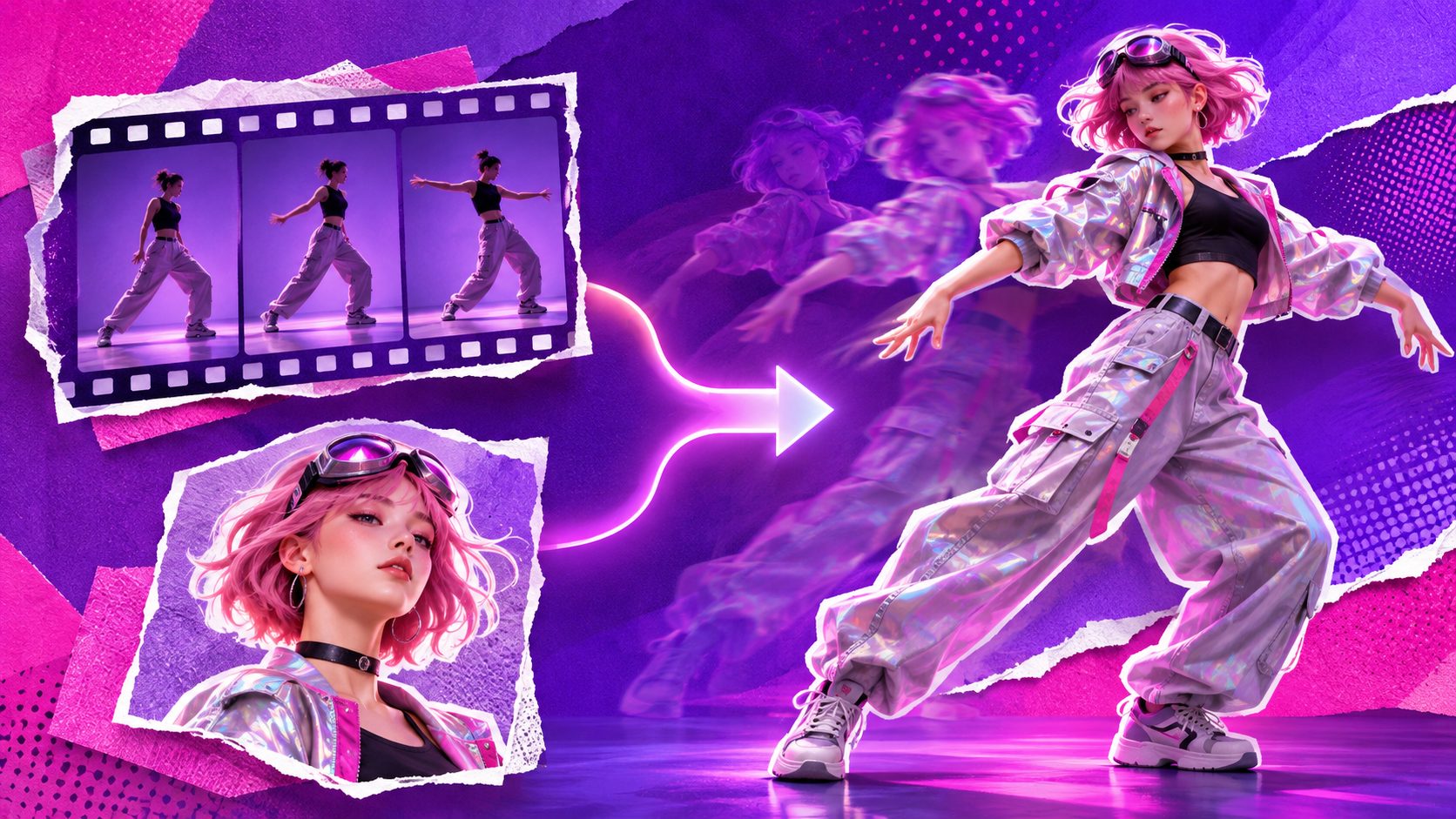
AI motion transfer turns a still character image into a moving video by borrowing body movement, gestures, timing, and sometimes camera motion from a reference clip. For ecommerce teams, it offers a practical way to create more ad variations from one approved character image without filming every performance from scratch.
What Is AI Motion Transfer?
AI motion transfer is a video generation method that transfers the movement from a source video to a target image. The source provides the performance; the image provides the character’s visual identity, clothing, style, or appearance.
In simple terms, the workflow is:
- Upload a reference motion video.
- Upload one character image.
- Let the model analyze the movement and map it to the image.
- Review the generated clip and select the strongest version.
The result is an AI motion transfer video in which the character may dance, gesture, turn, pose, or demonstrate an action based on the reference performance. Motion transfer is commonly described as separating “who is moving” from “how the subject moves,” although practical tools may also preserve or reinterpret camera movement and scene context.
Motion transfer AI vs. image-to-video
Image-to-video usually starts with a still image and a text prompt such as “wave at the camera” or “walk through a room.” The model invents the motion from the prompt.
Motion transfer AI starts with an actual performance reference. This gives you more direct control over timing, body position, rhythm, and gesture. It is especially useful when an ad concept depends on a recognizable movement, such as a product reveal, outfit turn, pointing gesture, or short dance.
Motion transfer vs. character replacement
Character replacement changes the person or character in an existing video while usually preserving much of the original performance. Motion transfer starts with a target image and uses the reference clip primarily as a movement source.
A useful rule is:
- Use image-to-video when you want the model to invent movement.
- Use character replacement when you want to change the subject inside an existing video.
- Use motion transfer when you want a specific character image to perform a selected reference movement.
For a dedicated character replacement workflow, see character swap.
How to Choose a Reference Motion Video
The reference clip matters more than most prompts. A clean, simple movement usually transfers better than a visually impressive but chaotic clip.
Choose a video with:
- One clearly visible performer
- A stable camera or predictable camera movement
- Good lighting and strong separation from the background
- Full or mostly visible body movement
- Limited overlap between arms, hands, and torso
- A movement that matches the target character’s body structure
For ecommerce advertising, choose references based on the intended selling action rather than popularity. A short “hold, point, and reveal” movement may be more useful than a complex dance because it leaves space for product messaging and a call to action.
Only use footage you have permission to use. This applies to creator videos, customer content, paid ads, stock footage, and clips taken from social platforms. Rights clearance should happen before production, not after an ad has been edited around the result.
A practical reference scorecard
Before generating, score the clip from 1 to 5 on these four factors:
| Factor | What to check |
|---|---|
| Subject visibility | Is the performer visible throughout the key action? |
| Motion clarity | Can you understand the gesture without replaying it? |
| Occlusion risk | Do hands, props, or other people block the body? |
| Ad usefulness | Does the movement support a hook, benefit, or CTA? |
A clip scoring 4 or 5 in each category is usually a stronger starting point than a dramatic clip with difficult camera angles. This scorecard is a practical production framework for reducing failed generations before spending time on editing.
How to Prepare the Character Image
The target image should show the character clearly and give the model enough information to reconstruct the body during movement.
Use an image with:
- A visible face and recognizable silhouette
- Clear separation between limbs and torso
- Consistent lighting
- A natural standing or action-ready pose
- Minimal cropping around hands, feet, and head
- Clothing that does not blend into the background
A full-body image is usually the most flexible choice for dance, walking, or large gestures. A waist-up image may work better for pointing, presenting, speaking, or product-holding movements.
If the image is too small or compressed, improve it before motion generation. An AI video enhancer can also help when the generated clip needs a later quality pass, but enhancement cannot reliably repair a missing hand, distorted face, or poorly framed source image.
A Repeatable Workflow for Ecommerce Ads
The most efficient process is to separate performance selection from creative messaging.
Step 1: Define the ad job
Decide whether the motion should create a hook, demonstrate a product, introduce a benefit, or transition into a CTA. One clip should have one primary job.
Examples:
- A character points toward a product headline.
- A model turns to reveal a new outfit.
- A presenter gestures toward three product benefits.
- A character performs a quick reaction before a discount message appears.
Step 2: Prepare two controlled inputs
Use one approved reference motion video and one approved character image. AdsTurbo Motion Control supports this two-input workflow: a reference motion video supplies the movement, while the character image supplies the visual subject. The same character image can also be reused with different reference clips to build creative variations.
Step 3: Transfer the motion
Use motion control AI when the goal is to transfer a specific movement rather than invent one from a text prompt. Start with the simplest useful reference. Complex movement is easier to evaluate after a clean baseline has been generated.
Step 4: Compare output quality
For social ads, choose the output quality that matches the placement and testing stage. A standard 720p version may be suitable for early concept review, while 1080p is more appropriate when the clip is ready for closer inspection or final use.
Step 5: Add the selling layer
Motion alone is not an ad. Add the product image, headline, benefit, offer, subtitles, and CTA in the editing stage. For a broader production system, the short video ad variants workflow can help organize different hooks, benefits, and story structures around the same product.
Common Failure Cases and Fixes
Hands look distorted
Hands are difficult when they move quickly, touch the face, or cross the torso. Use a slower reference with fewer finger-specific gestures. Choose a target image where the hands are visible and not cropped.
The face changes during movement
Identity drift often appears when the face turns sharply or becomes partially hidden. Start with a reference that keeps the face visible, then use shorter, clearer movements before attempting fast turns.
The character disappears behind an object
Occlusion is a major failure point. Avoid reference clips where props, hair, text overlays, or other people cover the subject. If the action requires a product, introduce it after the motion transfer rather than forcing the model to reconstruct a hand-product interaction immediately.
The movement feels unnatural
The source motion may not suit the target character’s proportions, clothing, or pose. Try a reference with a similar body orientation and movement scale. A character image facing forward will generally need a different reference from one shown in profile.
The output is visually soft
Check the source image and reference video before blaming the generation step. Use a sharper target image, avoid heavy compression, and apply enhancement after selecting the best motion result rather than enhancing every draft.
Creative Ideas for Social and Paid Ads
AI motion transfer works best when movement supports a clear visual message. Try these concepts:
- Three-benefit presenter: transfer a sequence of simple pointing gestures, then place one benefit beside each gesture.
- Product reveal: use a turn or step-in motion before showing the product and offer.
- Before-and-after reaction: create a surprised or satisfied gesture, then cut to the product result.
- Localized creative variants: reuse the same character image with different movement references, subtitles, and voice tracks for regional testing.
- UGC-style hooks: pair a natural hand gesture with a short problem statement before presenting the product solution.
The key performance variable is not how complicated the movement looks. It is whether the motion directs attention toward the next piece of information.
Frequently Asked Questions
Is AI motion transfer the same as motion capture?
No. Motion capture traditionally records movement data for a rigged digital character or 3D system. AI motion transfer commonly maps movement from a video directly onto a target image or character, often without requiring a conventional animation rig.
Can I transfer motion to an image?
Yes. The central use case is to transfer motion to image: a still character image becomes the visual subject of a generated video driven by a reference performance.
What is the best reference video for motion transfer?
A strong reference has one visible subject, readable gestures, stable framing, good lighting, and limited occlusion. For ads, the best reference is also short enough to support one clear marketing action.
Can one character image create multiple videos?
Yes. Reusing one approved character image with different reference movements is a practical way to create a controlled creative family while maintaining a consistent visual identity.
Should I use motion transfer or image-to-video?
Use motion transfer when exact movement matters. Use image-to-video when you want a model to invent motion from a prompt. Many ad teams can use both: motion transfer for repeatable performance and image-to-video for exploratory concepts.