Custom Fit Car Floor Mats Installation Video Guide

Summarize with
Summary
Create a custom fit car floor mats installation video guide that proves fit, retention, and pedal clearance. Use this safety-first ecommerce video framework.
By AdsTurbo.ai | Published 2026-10-25 | Updated 2026-10-25
A custom fit car floor mats installation video guide should do more than show a mat being placed on the floor. For automotive ecommerce sellers, the video must prove vehicle fitment, show how retention clips work, and visibly verify that the driver’s mat cannot interfere with the accelerator, brake, or clutch pedal.
This guide presents a safety-first video structure for DTC brands selling vehicle-specific floor mats, liners, and interior protection products.
What should a custom-fit floor mat installation video prove?
A strong installation video proves three things: the product matches the vehicle, the mat is secured correctly, and the pedals move freely after installation. These points answer the buyer’s main objections more effectively than a simple beauty shot.
Search results for floor mat installation commonly cover removing old mats, aligning the new mats, using clips, and checking pedal clearance. Manufacturer guides also emphasize vehicle-specific fitment, avoiding stacked mats, and inspecting the installation after cleaning or servicing. (matrikar.com)
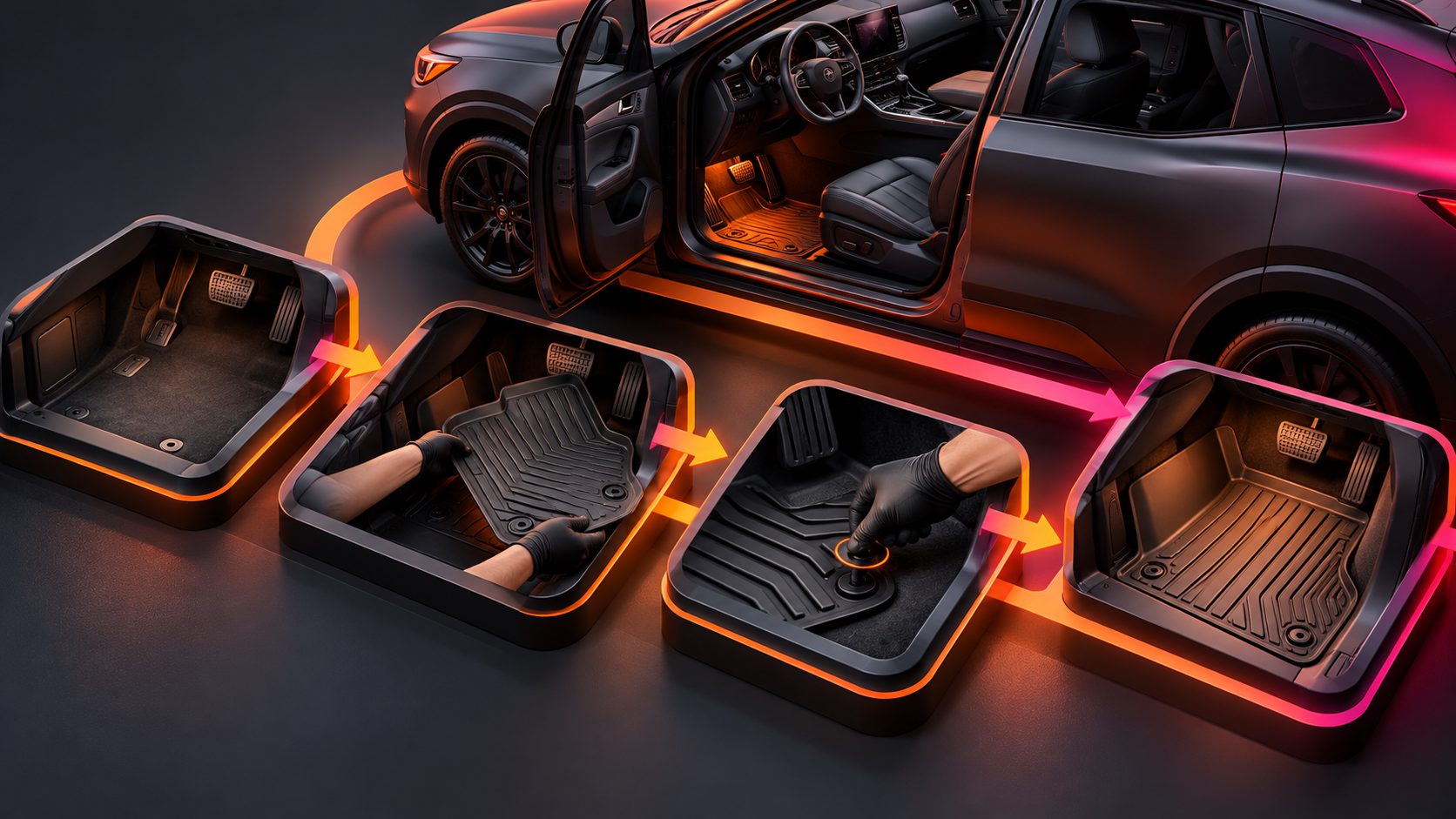
For ecommerce, organize the demonstration around this proof sequence:
- Confirm the vehicle application.
- Remove every existing floor mat.
- Clean and expose the footwell.
- Position the new mat without forcing it.
- Attach factory hooks, clips, or retention points.
- Check pedal travel from multiple angles.
- Show the finished fit from the driver’s seated perspective.
This sequence turns installation from a vague promise into a visible product demonstration.
How do you structure the video from opening hook to safety check?
The most effective format is a five-shot proof stack: fitment, preparation, placement, retention, and pedal verification. Each shot should answer one buyer question and remove one purchase objection.
Shot 1: Identify the vehicle fitment
Open with the vehicle year, make, model, trim, and mat position on screen. If the product is sold as a complete set, briefly label driver, passenger, second-row, and cargo pieces.
This prevents a common problem in automotive creative: showing an attractive installation without proving that the product belongs in the featured vehicle. The viewer should know immediately whether the demonstration matches their car.
Shot 2: Show a clean, empty footwell
Remove the original mat before placing the replacement. Film the empty floor area for one or two seconds, including the factory retention points.
Do not place one mat on top of another. Toyota’s installation instructions specifically warn against stacking mats and require the driver’s mat to be secured with the correct retention hooks or clips. They also recommend checking accelerator, brake, and clutch operation after installation. (static.nhtsa.gov)
Shot 3: Position the mat from the rear edge forward
Place the mat into the footwell and align its contours with the seat rail, center tunnel, door sill, and firewall. Avoid cutting away from the product before showing how it is intended to fit.
A useful close-up is a slow hand sweep around the perimeter. This shows whether the edges sit flat, whether the raised lip follows the interior shape, and whether the mat is bunching near the pedals.
Shot 4: Lock the retention system
Zoom in on the attachment point. Show the clip, hook, button, or locking mechanism engaging instead of skipping directly to the finished result.
A retention detail is particularly important for the driver’s side. Installation guides consistently treat secure attachment as a safety step, not merely a cosmetic feature. (cfautogear.ca)
Shot 5: Verify pedal clearance
End with the driver’s mat and all relevant pedals in the same frame. Press the accelerator, brake, and clutch, if equipped, through their normal travel while the vehicle is parked and turned off.
Film from two angles:
- A side angle showing the gap between the mat and pedal arms.
- A driver’s-eye angle showing that the mat does not rise, fold, or move forward.
Do not imply that a product is safe solely because it looks custom-shaped. The video should show the actual finished installation.
What is the best pedal clearance test for a product video?
The best pedal clearance test combines visual inspection, hand movement, and retention inspection. It should be completed after the mat is fully installed, not before.
Use this on-camera checklist:
| Check | What to show | Pass condition |
|---|---|---|
| Driver-side position | Mat aligned with the footwell | No rotated or folded edge |
| Retention point | Hook or clip attached | Mat does not slide when pushed |
| Accelerator | Pedal pressed fully | No contact or catching |
| Brake | Pedal pressed fully | Mat stays flat and clear |
| Clutch, if present | Full clutch movement | No obstruction at full travel |
| Edge stability | Mat pushed forward and sideways | No bunching near pedals |
This checklist is an original creative framework for turning safety requirements into video evidence. It is not a substitute for the vehicle manufacturer’s instructions or the product’s fitment documentation.
A short caption such as “Check all pedals before driving” is more useful than a generic “easy installation” claim. It directs attention to the action that matters.
How should the video explain custom-fit versus universal mats?
A custom-fit mat is designed for a particular vehicle application, while a universal mat is intended to fit a broader range of vehicles. The difference should be demonstrated visually rather than explained with unsupported superlatives.
| Feature | Custom-fit mat | Universal mat |
|---|---|---|
| Vehicle matching | Designed for a specific application | Broad vehicle compatibility |
| Edge coverage | Follows interior contours | May leave larger gaps |
| Retention | Often uses vehicle-specific points | May lack factory attachment |
| Installation message | “Match, align, secure, verify” | “Position and check carefully” |
| Video priority | Fitment and pedal clearance | Trimming, placement, and stability |
AutoZone’s comparison of universal, trim-to-fit, and custom-fit mats notes that universal products may slide because they do not use model-specific hooks or clips, while custom-fit products are designed for a particular vehicle. (autozone.com)
For a DTC brand, this distinction creates a better product page video: show why the buyer entered their vehicle details and what that information changes in the final fit.
How can automotive sellers produce installation videos at scale?
Create one master installation script, then swap the vehicle-specific footage, labels, and close-ups for each fitment group. The repeatable structure should remain consistent:
- 0–2 seconds: Vehicle and product identification.
- 2–5 seconds: Remove the old mat.
- 5–10 seconds: Position the new mat.
- 10–14 seconds: Secure the retention points.
- 14–18 seconds: Test every pedal.
- 18–20 seconds: Show the final fit and purchase prompt.
For more complex creative systems, an ecommerce product video workflow can help brands turn product assets into repeatable visual concepts. AdsTurbo also provides product video generation, ad cloning, subtitles, translation, AI upscaling, background replacement, and clip-by-clip editing. These tools can support variations for different vehicle models, audiences, and placements without changing the core safety proof.
Use captions for silent viewing and export versions for vertical, square, and horizontal placements. AdsTurbo Video Subtitle can generate synchronized captions and export either a captioned video or a separate subtitle file.
What should the final call to action say?
The CTA should come after the safety proof, not before it. A clear ending can include:
- “Select your vehicle to confirm fitment.”
- “See the full installation guide.”
- “Check the driver-side retention points.”
- “Choose the correct mat set for your vehicle.”
Avoid saying “fits every car” unless that statement is supported by the product’s actual fitment data. For vehicle accessories, precision creates more trust than broad claims.
For brands testing multiple hooks, AdsTurbo’s Ad Clone workflow for ecommerce video variations can be used to rebuild the same installation logic with different openings, captions, or calls to action. Keep the installation evidence unchanged while testing the marketing angle.
Frequently asked questions
Do I need to remove the original floor mats first?
Yes. The installation video should clearly show the original driver’s mat being removed before the replacement is positioned. Stacking mats can affect retention and pedal clearance.
Should the video show every mat in the set?
Show every position that matters to the buyer, but prioritize the driver’s side. The front driver mat requires the most detailed retention and pedal-clearance demonstration.
How long should an installation video be?
A focused version can work in 15–25 seconds if it shows fitment, placement, locking, and pedal verification. A longer product-page version can include vehicle identification and detailed close-ups.
Can one video work for multiple vehicle models?
Only if the demonstrated fitment and instructions genuinely apply to those models. Otherwise, create model-specific footage or clearly label the applicable vehicle range.
What if the mat moves during the test?
Stop the demonstration and resolve the fitment problem before driving. A mat that bunches, slides, or interferes with pedal travel should not be presented as correctly installed. (autozone.com)