Smart Home Automation Demo Video Maker: A Practical Ecommerce Workflow

Summarize with
Summary
Create clearer smart home automation demos with cross-device scenes, app walkthroughs, subtitles, and localized ad variants. Build your first workflow with AdsTurbo.
By adsturbo.ai | Published 2026-11-06 | Updated 2026-11-06
A smart home automation demo video maker helps ecommerce brands show how several devices work together—not just what one product looks like. The strongest demos connect a trigger, a visible device response, and a clear customer benefit in one short sequence.
Smart home buyers often need to understand the complete experience: a motion sensor detects activity, lights turn on, a camera sends an alert, or a voice command changes several devices at once. A well-planned video makes that chain easy to see before the customer buys.
What is a smart home automation demo video?
A smart home automation demo video is a short product explanation that shows how connected devices respond to a trigger, rule, or user command. Unlike a basic product showcase, it demonstrates relationships between devices, such as sensor-to-light, doorbell-to-phone, or thermostat-to-air-conditioner behavior.
The best structure is simple:
- Trigger: Show what starts the automation.
- Connection: Make the app, hub, or command visible.
- Response: Show two or more devices reacting.
- Benefit: Explain the practical outcome.
- Call to action: Direct viewers to the product page, bundle, or setup guide.
This structure is especially useful for D2C brands selling hubs, sensors, switches, cameras, smart lighting, appliances, and multi-device starter kits.
Industry demos commonly emphasize multi-protocol environments, including combinations of Zigbee, Wi-Fi, Bluetooth, and sub-GHz connectivity. A Texas Instruments building automation demo, for example, presents several device types through a multi-protocol gateway rather than explaining each device in isolation. (ti.com)
Why ordinary product videos fail to explain smart home systems
A single close-up of a smart plug or light bulb rarely communicates the value of automation. It may show design and materials, but it does not answer the buyer’s most important questions:
- What starts the automation?
- Which devices work together?
- Does the action happen automatically or require a phone?
- What does the user see in the app?
- What happens if the customer owns products from different categories?
- Is the benefit convenience, security, comfort, energy management, or all four?
The common mistake is to show a sequence of attractive shots without making the logic visible. Viewers see a light turn on, but they do not understand whether a sensor, schedule, voice assistant, or manual tap caused it.
A better approach is to treat the video as a visual proof of a rule. Use on-screen labels such as “Motion detected,” “Routine started,” and “Lights activated.” This turns an invisible software workflow into an observable product experience.
A cross-device storyboard that works
For most smart home products, a 20–35 second demo can follow this five-scene framework.
Scene 1: Start with a real-life friction point
Open with a situation the customer recognizes:
- Coming home with both hands full
- Waking up in a dark hallway
- Leaving the house without checking the door
- Preparing for bedtime
- Managing a room from another location
Avoid beginning with a logo animation. The first seconds should establish why the automation matters.
Scene 2: Show the trigger
Make the trigger visually explicit. This might be a person entering a room, a door opening, a temperature change, a scheduled time, or a command in the mobile app.
If the trigger is not visible in the source footage, use a short UI overlay or a close-up of the relevant sensor. The viewer should not have to infer what happened.
Scene 3: Show the chain reaction
This is the core of the demo. Show the products responding in sequence:
- The sensor detects movement.
- The hallway lights turn on.
- The camera begins recording.
- A phone receives an alert.
- The thermostat changes to the selected temperature.
Use split-screen or quick cuts when several rooms are involved. A product video generator can help turn product photos, reference clips, and selling points into a first draft, but the order of events still needs to reflect the actual customer journey.
Scene 4: Add the app or control layer
Show the dashboard, automation rule, or device status whenever possible. This reassures viewers that the experience is not random animation.
If the brand has app screenshots rather than recorded footage, combine them with product images and motion graphics. AdsTurbo Product Image supports JPG and PNG uploads and can create product visuals in multiple formats for ecommerce channels.
Scene 5: End with a specific outcome
Replace vague claims such as “make your home smarter” with a concrete result:
- “Lights on before you reach the hallway”
- “One routine for the entire evening”
- “Check your door from anywhere”
- “Automate comfort room by room”
The final frame should show the product, the main benefit, and one clear action.
How to demonstrate mixed protocols without confusing viewers
Cross-protocol automation is a valuable differentiator, but technical diagrams can quickly become difficult to follow. The video should explain the user experience first and the connectivity details second.
Use a three-layer visual model:
| Layer | What to show | Why it matters |
|---|---|---|
| User action | Person, schedule, sensor, or voice command | Establishes the trigger |
| Control layer | App, hub, routine, or automation rule | Explains the connection |
| Device response | Lights, locks, cameras, thermostats, or appliances | Proves the result |
For example, a brand can show a motion sensor triggering a hallway light and a phone notification. A small caption can identify the connection method, while the main narration focuses on the benefit.
This is more effective than placing every protocol name on screen at once. Technical information should support the story, not replace it.
Using AI to create and localize smart home demo ads
An AI workflow is most useful when it produces controlled variations, not one generic video. Start with a master script and create versions by changing one variable at a time:
- Trigger: motion, schedule, voice, or remote control
- Audience: apartment renter, homeowner, parent, or tech enthusiast
- Benefit: convenience, safety, comfort, or energy awareness
- Format: 9:16, 1:1, or 16:9
- Language: English, Spanish, Japanese, or another target market
- Presenter: product-only, AI actor, or creator-style delivery
AdsTurbo supports Ad Clone workflows that can analyze a reference video and reconstruct its opening, pacing, shot logic, and call-to-action structure. This is useful when a brand has identified a strong advertising pattern but needs new product, audience, or language variations.
For a broader ecommerce workflow, Ecommerce Ad Creative Variation Generator provides a useful framework for testing hooks and offers without changing the entire campaign concept.
AdsTurbo also supports video translation, AI upscaling, lip sync, character replacement, subtitles, motion control, and background replacement. Subtitle exports can include either a video with embedded captions or a separate subtitle file, which is useful for adapting one demo across TikTok, Instagram Reels, YouTube Shorts, and product pages.
A practical production workflow for ecommerce brands
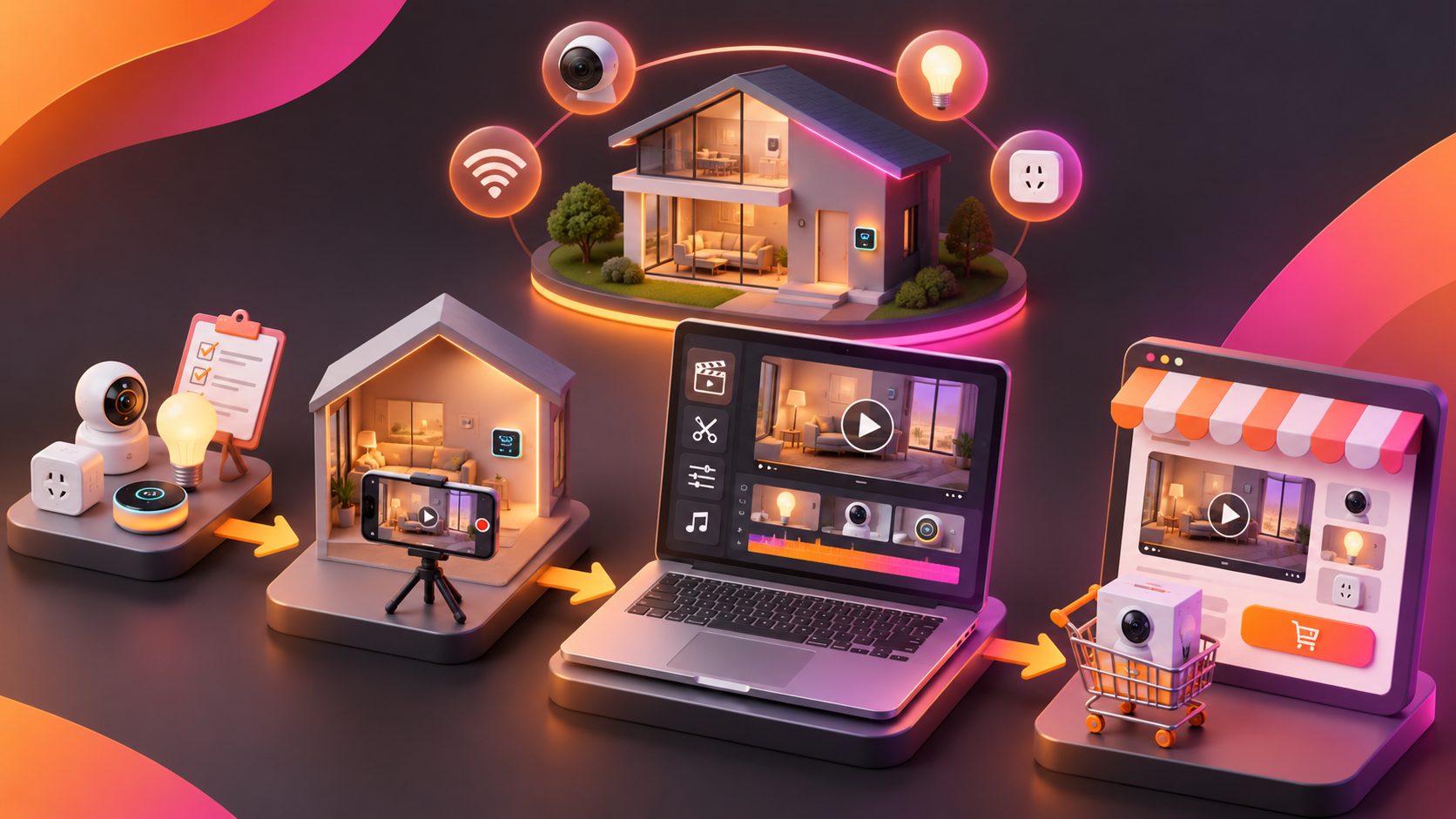
Use this repeatable process before generating multiple versions:
- List the real automation rule. Write the trigger, condition, action, and expected result.
- Collect visual proof. Prepare product photos, app screenshots, short clips, logos, and brand colors.
- Choose one customer scenario. Do not combine bedtime, security, energy savings, and entertainment in one 20-second ad.
- Create the master demo. Use a clear voiceover, visible labels, and a consistent visual sequence.
- Generate controlled variations. Change only the hook, audience, language, or offer in each version.
- Review technical accuracy. Confirm that device names, app states, protocol claims, and setup steps match the actual product.
- Export platform versions. Prepare vertical, square, and landscape cuts with readable captions.
- Compare performance by angle. Evaluate hook retention, click-through rate, product-page engagement, and conversion—not just views.
AdsTurbo supports asynchronous generation, with completion available through status polling or Webhook callbacks. For teams producing many variations, advanced plans support team workflows, API access, and custom workflow support.
For products that need more visual polish, Motion Control Athletic Shoes offers a relevant example of how movement can be planned around product behavior rather than decorative effects.
Common mistakes to avoid
Showing devices without showing the rule
A series of product shots is not an automation demo. Add the trigger and the sequence connecting the devices.
Overloading the first three seconds
Do not introduce every feature at once. Lead with one problem and one visible outcome.
Making unsupported technical claims
Avoid promising universal compatibility, instant response, or seamless integration unless the product documentation confirms it. A believable demo is more persuasive than an exaggerated one.
Hiding the product behind a presenter
AI actors can make a video feel native to social feeds, but the product and its behavior should remain the focus. Use the presenter to frame the scenario, then return to the device and app.
Reusing one cut everywhere
A product-page video can explain more than a 15-second social ad. Create separate edits for discovery, consideration, and conversion.
Frequently asked questions
What should a smart home automation demo video show first?
Start with a recognizable customer problem, then show the trigger and the connected device response. The viewer should understand the benefit before seeing technical specifications.
Can one video demonstrate several smart home products?
Yes. Use one automation rule as the narrative spine. Show the devices in sequence and explain how the app, hub, or routine connects them.
What video formats are useful for smart home ads?
Vertical video works well for TikTok, Reels, and Shorts. Square formats can suit some social placements and marketplaces, while landscape video is useful for product pages, YouTube, and presentations.
How can a brand create localized versions?
Create a master version first, then adapt the voiceover, captions, on-screen text, presenter, and offer for each market. Keep the product behavior and core automation logic consistent.
Can product photos be used to start the workflow?
Yes. Product images can provide the visual foundation for product videos, banners, lifestyle scenes, and feature-focused creative. Clear JPG or PNG product photos on a plain background generally provide the strongest starting material.
Conclusion
A smart home demo succeeds when it makes an invisible automation rule easy to understand. Show the trigger, reveal the control layer, prove the device response, and connect the result to a specific customer benefit.
For D2C brands, the most scalable workflow is not one polished video. It is a structured system that turns one accurate automation story into multiple hooks, audiences, languages, formats, and offers. AdsTurbo supports that process with product video generation, Ad Clone, subtitles, translation, motion control, AI upscaling, and API-based workflows.
Explore AdsTurbo to build and test product-focused smart home video creatives.