Author: adsturbo.ai | Published: September 19, 2026 | Updated: September 19, 2026
A flat lay to 3D fashion runway video AI workflow turns a garment photo into a short, model-led fashion clip without organizing a conventional video shoot. For Shopify and DTC sellers, the practical goal is not merely realistic motion—it is producing testable ads while preserving the item’s color, silhouette, print, and construction.
Most generators create a 3D-looking video, not a measured 3D garment simulation. Treat the result as advertising creative rather than proof of exact fit or fabric behavior.
What Does Flat Lay to Runway Video Generation Actually Do?
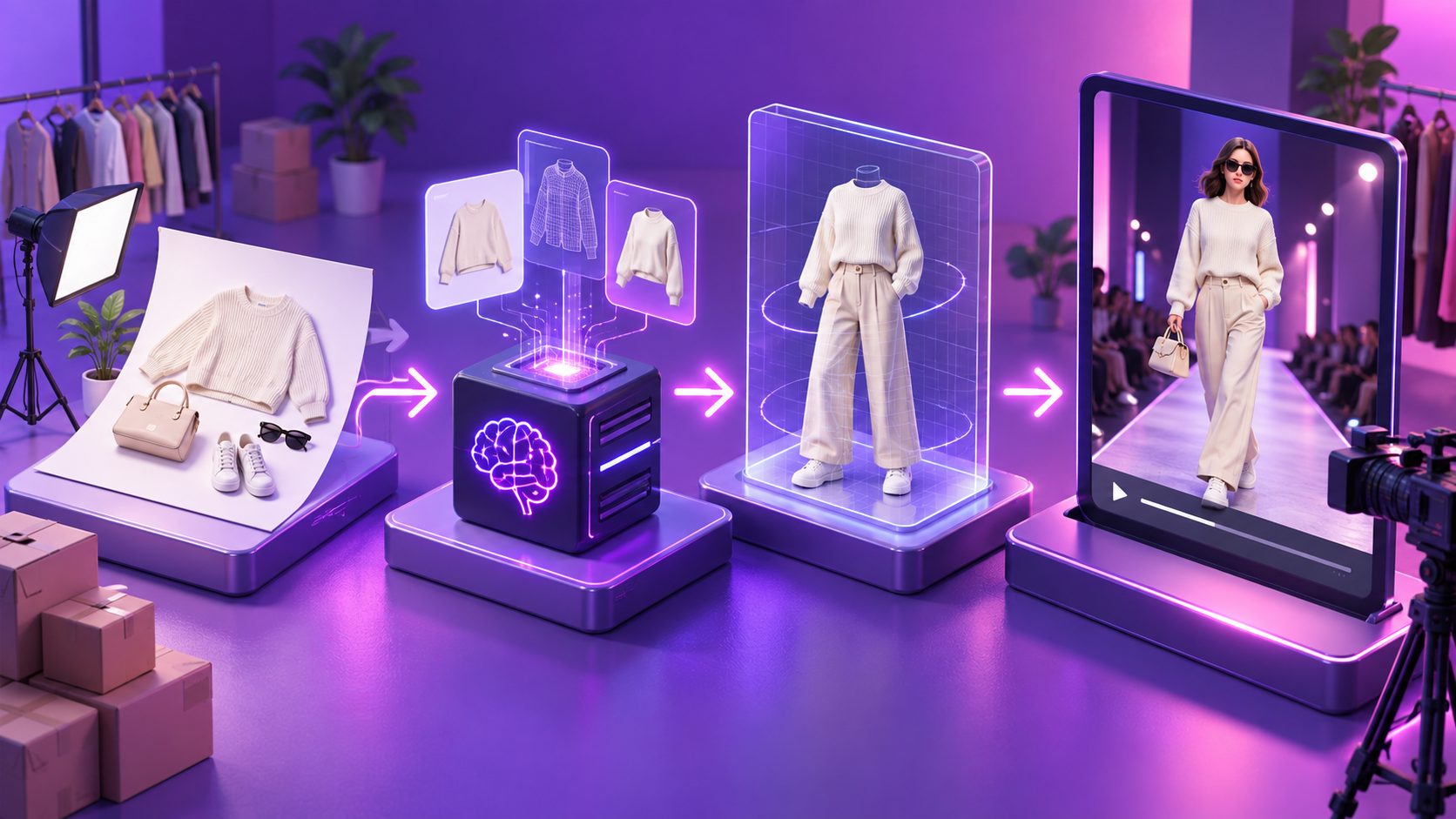
Flat-lay-to-runway generation combines garment extraction, virtual dressing, character generation, and image-to-video animation. The system interprets a two-dimensional clothing photo, places the item on a virtual model, and synthesizes frames that suggest walking, turning, or posing.
The process usually has three distinct stages:
- Garment preparation: Isolate the apparel and remove distracting backgrounds.
- On-model visualization: Generate or approve a model wearing the garment.
- Motion generation: Animate the approved frame with a restrained runway movement.
Keeping these stages separate provides more control than asking one prompt to invent the model, garment fit, location, and motion simultaneously. It also makes failed outputs easier to diagnose.
Research into video virtual try-on identifies garment-detail loss and frame-to-frame inconsistency as persistent challenges. In practice, that means logos may drift, buttons may disappear, and hems may change length during movement. (arxiv.org)
Which Flat Lay Images Produce the Best Results?
The best input is a sharp, evenly lit image showing the complete garment on a plain, contrasting background. Sleeves, straps, hems, prints, fasteners, and necklines should remain visible rather than folded beneath other fabric.
Use this source-image checklist:
- Photograph the garment directly from above.
- Keep the camera parallel to the surface.
- Use diffused light to reduce hard shadows.
- Leave space around every edge.
- Remove hangers, hands, tags, and styling props.
- Capture a separate detail image for prints or embroidery.
- Export in JPG or PNG without aggressive compression.
AdsTurbo Product Image accepts JPG and PNG product photos, with clear photos on solid-color backgrounds producing the best results. Sellers can use its image workflow to create product-focused assets in multiple aspect ratios before moving into video production.
For a broader asset-preparation process, see this guide to creating clothing product videos for ecommerce ads.
How Should You Build a Virtual Runway Clip?
A reliable workflow locks the garment and model before adding complex movement. Generate the cleanest possible on-model still first, approve its product fidelity, and then animate it using a simple walk, quarter turn, or two-pose sequence.
1. Create a Product Reference Pack
For each SKU, collect a front flat lay, back view, close-up, color reference, and product-page description. Name files consistently, such as SKU-color-view, so incorrect variants do not enter the production queue.
2. Approve the On-Model Keyframe
Compare the generated still with the actual item. Reject it if the neckline, sleeve length, print placement, closure, or overall silhouette changes.
3. Apply Restrained Motion
Start with one slow forward walk or a gentle 30-degree turn. Fast spins, crossed arms, flowing hair, and extreme camera motion create more opportunities for garment distortion.
AdsTurbo Motion Control can transfer movement from a reference video to a static character image. Once a suitable on-model frame has been approved, this provides a controlled route for testing different movement references.
4. Finish the Ad
Add the product name, one evidence-based benefit, a price or promotion if current, and a direct CTA. AdsTurbo also provides clip-by-clip editing, video subtitles, background replacement, video translation, and resolution upscaling for post-production.
How Can Sellers Measure Garment Fidelity?
Garment fidelity should be scored at multiple frames, not judged from the opening image alone. A clip may look accurate at rest but alter the product during a step, arm movement, or camera turn.
Use the 10-point Garment Fidelity Gate, an original pre-publication framework:
| Check | Scoring question | Points |
|---|---|---|
| Color | Does the dominant color remain consistent? | 0–2 |
| Silhouette | Are length, volume, and cut preserved? | 0–2 |
| Construction | Are sleeves, straps, seams, and closures correct? | 0–2 |
| Surface details | Do prints, logos, and textures remain stable? | 0–2 |
| Temporal stability | Does the garment stay consistent through motion? | 0–2 |
Review the first frame, one mid-step frame, and the final turn or pose. Publish at 9–10, manually review at 7–8, and regenerate or reject anything below 7. These thresholds are production rules, not claims that an AI video proves real-world fit.
For a controlled pilot, select 12 SKUs across three difficulty levels: four plain tops, four patterned garments, and four loose or layered items. Generate three motions per SKU for 36 outputs, then record fidelity score, regeneration count, and publishable-clip rate. This test reveals which categories deserve automation before the full catalog is processed.
How Do You Batch Videos Without Multiplying Errors?
Batch production should scale approved combinations, not unreviewed prompts. Establish one visual recipe per garment category, test it on representative products, and expand only after the outputs pass the fidelity gate.
A practical batch matrix includes:
- Three hooks: product reveal, styling problem, and new-arrival announcement.
- Two motions: forward walk and controlled turn.
- Two formats: 9:16 for vertical feeds and 1:1 for broader placements.
- One verified product claim: drawn from the listing or approved brand documentation.
That produces 12 creative combinations without forcing the AI to reinvent the garment. For larger catalogs, this bulk SKU video generation workflow explains how to separate reusable templates from product-level data.
AdsTurbo generation tasks run asynchronously and can return completion events through status polling or webhooks. Higher-level plans also support API access, team workflows, and custom workflow assistance, which can help sellers organize approval queues rather than downloading files one by one.
What Should a Fashion Runway Ad Show?
A useful runway ad answers one merchandising question quickly: what the item looks like on a moving body. It should not bury the garment beneath cinematic effects or imply properties that the original product cannot substantiate.
A concise 10–15 second structure is:
- 0–2 seconds: Show the garment and primary hook.
- 2–7 seconds: Present a clean walk with the full silhouette visible.
- 7–11 seconds: Add a controlled turn or detail crop.
- 11–15 seconds: Display the product name, offer, and CTA.
Use separate variants for different hooks instead of placing every selling point into one video. The TikTok ad creative variations workflow provides a structured approach to testing hooks, formats, and visual openings.
For international campaigns, translate on-screen text and audio only after the base video passes product QA. AdsTurbo supports video translation and multilingual subtitles; this ecommerce video localization guide covers the wider adaptation process.
What Compliance Checks Are Needed Before Publishing?
AI-generated fashion ads must represent the product truthfully. The FTC states that advertising claims must be truthful, non-deceptive, and supported by evidence; responsibility includes both explicit statements and reasonable implied claims. (ftc.gov)
Before publishing, confirm that:
- The displayed color is reasonably faithful to the product.
- The AI has not added pockets, fasteners, accessories, or materials.
- The video does not promise an unverified fit or slimming effect.
- Promotions, dates, and prices match the landing page.
- You have appropriate rights to product images, audio, models, and references.
- The final frame leads to the exact advertised SKU.
Frequently Asked Questions
Can one flat lay generate a usable fashion video?
Yes, but additional front, back, and detail references improve quality control. A single image may leave the system guessing about hidden construction, garment length, and back details.
Is a virtual runway video the same as 3D garment simulation?
No. Most marketing tools synthesize video frames that appear three-dimensional. They do not necessarily calculate fabric physics from a technical pattern, material specification, or body measurement.
Which garments are hardest to animate?
Layered outfits, reflective materials, transparent fabric, dense text, asymmetrical cuts, and loose garments are more likely to change between frames. Start with simple tops or dresses when validating a new workflow.
How many variants should a seller generate?
Begin with three motions for each of 12 representative SKUs. Measure the publishable rate and regeneration workload before expanding. Once a category has a reliable recipe, vary the hook, model, background, language, and aspect ratio separately.
Where does AdsTurbo fit into the workflow?
AdsTurbo can support product-video generation, motion control, character replacement, subtitles, translation, background replacement, clip-level editing, and upscaling. Use these tools after establishing strict source-image and garment-fidelity standards.