Claude
 Cursor
Curve Model Video Generator for Clothing Brands: A Practical AI Workflow

Summarize with
Summary
Learn how a curve model video generator for clothing brands can turn product photos into inclusive fashion ads, with a practical workflow for fit, motion, and testing.
By adsturbo.ai | Published 2026-11-25 | Updated 2026-11-25
A curve model video generator for clothing brands helps apparel sellers turn product photos into short fashion videos featuring fuller-bodied or curve models. The most useful workflow is not simply “generate a model.” It is a controlled process that protects garment details, communicates fit, and creates several ad variations for TikTok, Instagram Reels, and product pages.
For inclusive fashion brands, this matters because shoppers need to see more than a flat-lay image. They want to understand how fabric falls, how a silhouette moves, and how the garment looks on a body that resembles their own.
What is a curve model video generator?
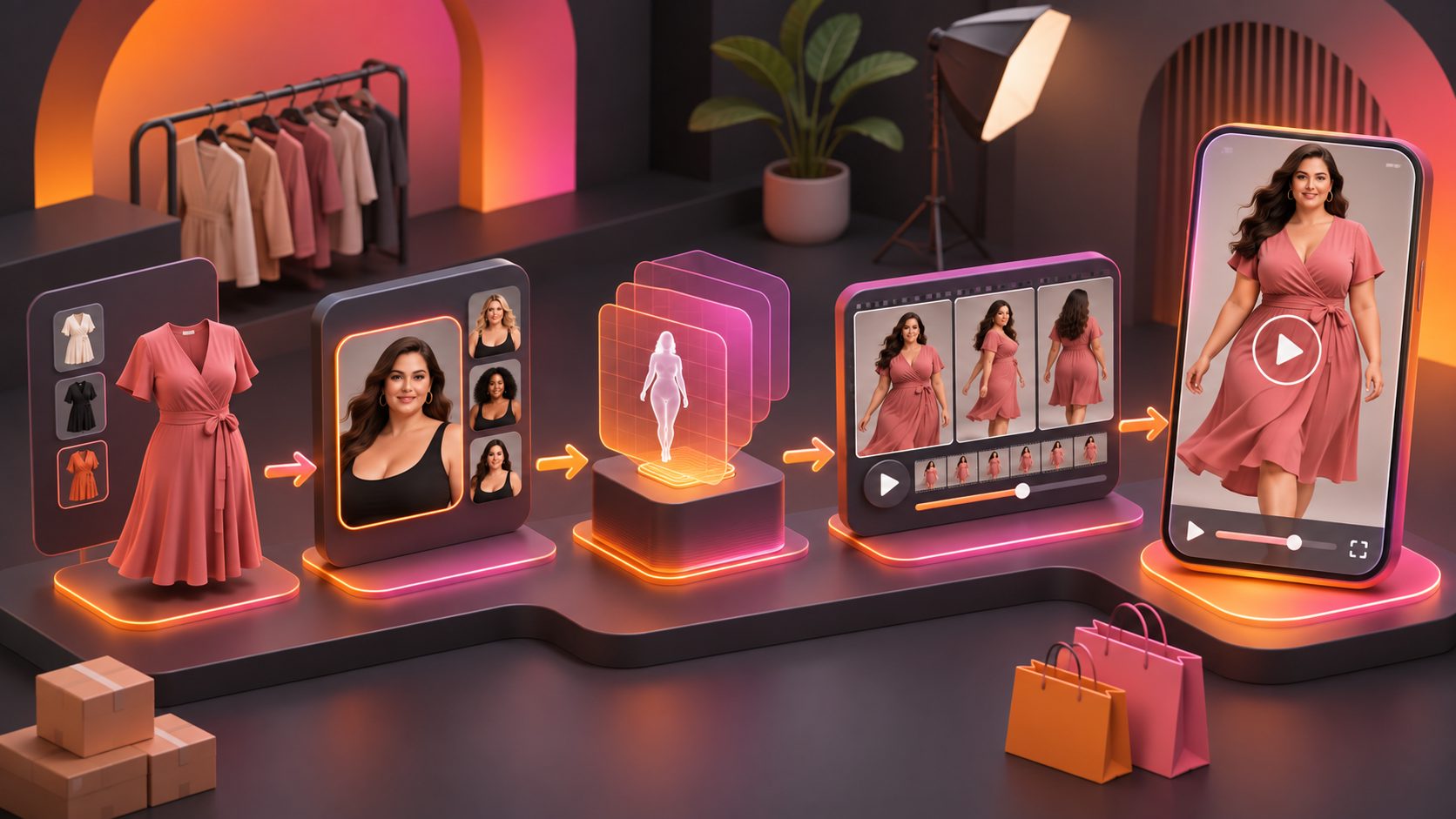
A curve model video generator is an AI image-to-video workflow that places an apparel product on a generated or selected model, then adds movement such as walking, turning, posing, or close-up product inspection.
The strongest systems begin with a product image rather than relying entirely on text prompts. This distinction is important: image-to-video workflows are generally better suited to preserving a real garment’s color, print, neckline, and silhouette, while text-only generation may invent clothing that only looks similar to the original product. This product-accuracy issue is also emphasized in current comparisons of AI fashion video tools. (vaybel.com)
For clothing brands, the output can support:
- Paid social ads and UGC-style creative
- Product detail page videos
- Size-inclusive campaign concepts
- Seasonal lookbooks
- New-product testing before a full photoshoot
- Localized versions for different markets
This does not replace fit testing or product photography when exact construction details are legally or commercially important. Instead, it gives ecommerce teams a faster way to create exploratory and performance-focused creative.
Why curve-model video matters for apparel advertising
Curve fashion buyers often receive less visual representation than straight-size shoppers. A model video can make the product story more specific by showing proportion, stretch, drape, sleeve length, rise, and movement.
However, inclusivity should not be reduced to selecting a body label. The creative should also reflect the product’s actual sizing, construction, and intended use. A curve model wearing a structured blazer should be shown moving differently from a model wearing a soft jersey dress.
Research and industry reporting show that AI-generated models can expand representation in fashion imagery, but the approach also raises questions about authenticity and the role of professional models. The practical lesson for brands is to use AI as a creative production layer while keeping product claims, sizing information, and fit guidance grounded in real product data. (apnews.com)
What product images create the best results?
The best starting image is a clear JPG or PNG product photo with a simple background, even lighting, and minimal obstruction. AdsTurbo’s Product Image workflow is designed for JPG or PNG uploads, and clear product photos on a solid-color background are recommended for stronger analysis.
Before generating a video, prepare:
- A front-facing product image showing the complete garment.
- A close-up image for fabric, stitching, print, or texture.
- A side or back view when fit or construction is a selling point.
- The key product claims, such as stretch, pockets, wide-leg cut, or adjustable straps.
- The intended audience and setting, such as workwear, travel, casual weekend, or occasionwear.
A useful rule is to separate what the AI should create from what the product image must preserve. The AI can create the model, background, camera movement, and editing rhythm. The source image should determine the garment’s non-negotiable details.
A five-check workflow for better curve fashion videos
The following framework is an original production checklist for evaluating generated apparel videos. It focuses on commercial usefulness rather than visual novelty.
1. Garment integrity
Check whether the product keeps its original color, logo placement, seams, neckline, hem, and print. If two or more important details change, use the clip for concept testing only—not as a product-detail demonstration.
2. Body and garment relationship
Look for natural contact between the fabric and the body. Pay attention to waistbands, armholes, bust shaping, sleeve tension, and the way the garment moves around the hips.
3. Motion simplicity
Start with one action per clip: a turn, a short walk, a hand movement, or a fabric close-up. Complex choreography creates more opportunities for the garment to warp or change.
4. Message clarity
A viewer should understand the product and the benefit within the first few seconds. Use a direct hook such as:
- “A polished fit for everyday curves”
- “Stretch comfort without losing structure”
- “One blazer, three work-to-weekend looks”
5. Platform adaptation
Create separate versions for vertical short-form video, square placements, and wider product-page use. Do not simply crop one master file if the model, garment, or headline becomes difficult to see.
This checklist can be scored from 0 to 2 for each category, producing a simple 10-point Curve Fit Integrity Score. A score of 8 or higher is a reasonable starting point for paid testing; a lower score usually indicates that the product image, motion, or message needs revision. This is a working evaluation framework, not a platform benchmark.
How to create a curve model video ad step by step
A practical workflow looks like this:
- Upload the product image. Use a clear JPG or PNG image with a simple background.
- Define the audience. Specify the intended size range, style context, and customer use case.
- Choose one visual concept. Examples include a try-on walk, mirror-style outfit check, or close-up fabric demonstration.
- Add the selling point. Keep it tied to the product, such as stretch, coverage, pockets, or layering.
- Generate a short draft. Begin with a restrained camera movement and a clear subject.
- Review the garment frame by frame. Check logos, patterns, edges, hands, and areas where fabric overlaps.
- Add captions and a CTA. AdsTurbo Video Subtitle can transcribe speech and create time-synced subtitles, with styling suitable for TikTok, Instagram Reels, and YouTube Shorts.
- Create controlled variants. Change one variable at a time: hook, background, model styling, voiceover, or CTA.
- Export platform-specific versions. Test vertical, square, and landscape formats according to placement.
- Compare performance by creative angle. Track thumb-stop rate, watch-through, click-through, and add-to-cart—not only views.
For a broader apparel production workflow, see this guide to an AI fashion model video generator for clothing ads.
How to make the output look more authentic
Authenticity usually comes from restraint. Avoid excessive camera movement, unrealistic poses, and backgrounds that distract from the garment. A clean studio, bedroom, hallway, or outdoor sidewalk can work better than a highly cinematic scene.
Use close-ups strategically. A full-body shot communicates silhouette, while a medium shot can show neckline and sleeve fit. A close-up can demonstrate texture or hardware, but it should not imply a level of detail that the source image cannot support.
Voice and captions should also match the brand. For a premium label, use concise product language. For a casual direct-to-consumer brand, a first-person UGC-style script may feel more natural. AdsTurbo supports video translation and subtitle generation, which can help adapt the same creative concept for different markets.
If the source footage or generated draft is soft or heavily compressed, an AI video enhancer can improve clarity before export. Upscaling should be treated as a finishing step; it cannot reliably repair an incorrect garment shape or missing product detail.
Curve model videos versus traditional photoshoots
AI-generated model videos are strongest when a brand needs speed, variation, or early creative exploration. Traditional photography remains stronger when the campaign requires exact fit documentation, tactile fabric realism, or high-touch art direction.
| Use case | AI curve model video | Traditional photoshoot |
|---|---|---|
| Testing multiple hooks | Fast and flexible | Slower to revise |
| Showing exact fit | Needs careful review | Stronger with real samples |
| Producing many variants | Efficient | More expensive per variation |
| Early product launch concepts | Useful | May require more preparation |
| Legal or technical product claims | Requires verification | Easier to document |
A hybrid model is often most practical: use AI to test concepts and audiences, then invest in a full shoot for the winning styles or highest-value campaigns.
Common questions
Can AI generate videos for plus-size clothing brands?
Yes. AI can create short model-led videos from product images and add movement, settings, captions, and advertising structure. The result should be checked carefully for garment accuracy and realistic fabric behavior.
What image format should I upload?
Use a clear JPG or PNG product image. A solid-color background, even lighting, and a complete view of the garment generally provide a better starting point than a cluttered lifestyle image.
Should the model move a lot?
Usually, no. Simple movements such as walking, turning, or adjusting a sleeve are easier to review and more likely to preserve the garment than complex choreography.
Can one video be used on every platform?
It can be adapted, but one crop rarely performs equally well everywhere. Prepare platform-specific versions with readable captions, visible product details, and an appropriate aspect ratio.
How many variations should a clothing brand create?
Start with a small controlled batch: three hooks, two settings, and two CTAs. This creates 12 combinations while making it easier to identify which variable influenced performance.
Final takeaway
A curve model video generator for clothing brands is most valuable when it connects inclusive representation with disciplined product presentation. Start with accurate product images, use simple motion, evaluate every important garment detail, and create variants that change one creative variable at a time.
The goal is not to make every video look spectacular. The goal is to help shoppers understand the garment, recognize themselves in the presentation, and take the next step with confidence.